Fix unresponsive mobile gaming triggers with a simple foil hack
A 1cm × 2cm strip of aluminum foil. That is the bill of materials. Total cost: fractions of a paisa.
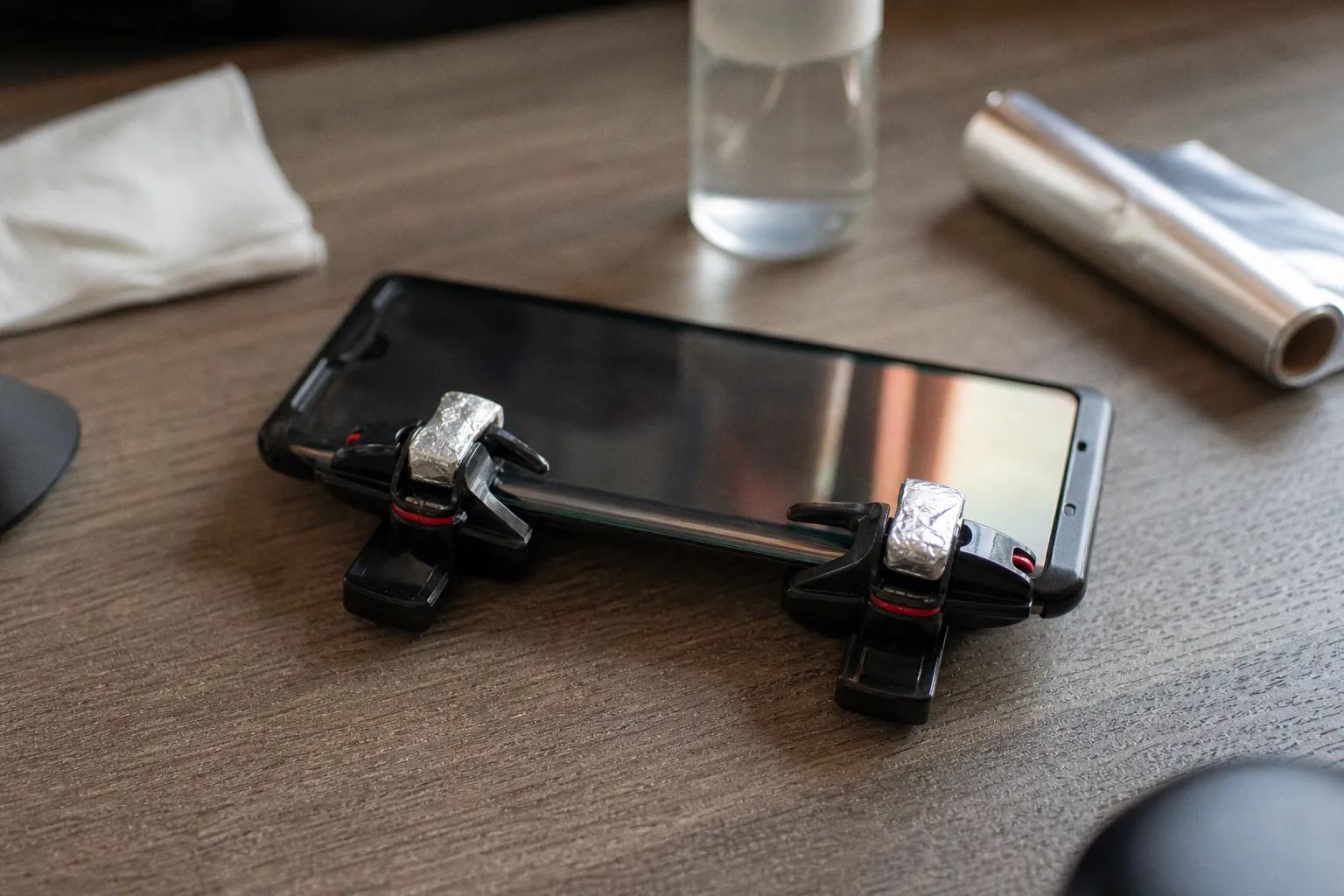
This is not a hack born from some obscure engineering forum. It has been circulating through grassroots BGMI and Call of Duty: Mobile communities for years, tested and retested across thousands of ranked matches. The physics are dead simple. The execution, however, has nuance — and getting it wrong produces ghost touches, missed inputs, or micro-scratches on your display. This guide covers the full procedure with the precision it deserves.
---
The Science of Capacitive Touch and Why Mechanical Triggers Fail
Capacitive touchscreens do not respond to pressure. They respond to changes in an electrostatic field. Your fingertip carries a small electrical charge. When it approaches the screen's grid of transparent conductors (typically indium tin oxide), it disrupts the field at that point. The controller registers the disruption as an input.
A mechanical L1R1 trigger works by pressing a conductive rubber or silicone pad against the screen surface. Your finger presses the trigger lever. The lever arm pushes the pad down. The pad — made of conductive rubber loaded with carbon or silver particles — transmits your body's charge through to the display. Input registered.
The failure mode is predictable. Over weeks of intense use — particularly in games like BGMI that demand rapid, repetitive trigger actuation during close-range sprays — the conductive pad degrades. Carbon particles scatter. The rubber hardens. An air gap develops between the pad and the screen surface. The chain breaks. Your body's charge never reaches the digitizer.
Most "dead" triggers are not mechanically broken. The conductive path between your finger and the screen has simply degraded — and aluminum foil restores it with zero resistance.
This is why tapping the screen directly still works fine. Your actual fingertip is an excellent conductor. The problem sits entirely in the intermediary — the trigger's rubber tip that has lost its conductivity over time.
How Degradation Progresses
The timeline varies by trigger quality and usage intensity, but the pattern is consistent:
1. Weeks 1–4: Full sensitivity. No issues.
2. Weeks 5–8: Occasional missed inputs during rapid-fire sequences. Most players blame network latency.
3. Weeks 9–12: Intermittent registration. You start pressing harder, which accelerates wear on the pad.
4. Beyond week 12: Complete failure. The trigger sits in a drawer. The player buys a new set for ₹150–₹300.
The foil hack intervenes at stage 3 or 4. It does not repair the degraded pad — it bypasses it entirely.
---
Preparing the Surface and Materials for Maximum Conductivity
Before touching aluminum foil to anything, clean the screen. This step is not optional.
Oil and sweat from your fingertips form a thin insulating film on the display surface. Even a 0.01mm layer of skin oil reduces the foil's contact effectiveness significantly. The buildup is invisible to the naked eye but measurable in capacitance change.
Required Materials
- Aluminum foil: Standard kitchen-grade. Thickness between 12–16 microns is sufficient.
- Adhesive tape: Clear office tape works. Electrical tape (PVC, 0.13mm thickness) is better — it conforms to irregular shapes and does not leave residue on the foil.
- Isopropyl alcohol: 70% concentration. Higher concentrations (90%+) evaporate too fast and are less effective at dissolving oil-based residue.
- Microfiber cloth: Not paper towel. Paper fibers leave particulate residue that interferes with conductivity.
Cleaning Protocol
1. Apply a small amount of 70% IPA to the microfiber cloth — not directly to the screen. Direct application risks liquid seeping into the speaker grille or charging port.
2. Wipe the contact zone (the area where the trigger pad meets the display) in a single direction. Circular motions redistribute oil rather than removing it.
3. Allow 10 seconds of air-drying time. IPA at 70% concentration leaves no residue when fully evaporated.
4. Verify the zone is dry and clean to the touch. It should feel uniformly smooth, not tacky.
A clean screen is not a suggestion. A fingerprint-thin oil film cuts conductivity enough to turn a working foil hack into an intermittent failure source.
If you use a screen protector — particularly a tempered glass unit over 0.3mm thick — clean both the protector surface and the underside of the trigger arm. Thicker protectors (0.5mm units are common in India's budget accessory market) create a larger gap between the trigger pad and the display's conductive layer. The foil compensates for this, but only if the contact surfaces are clean.
---
Step-by-Step Application of the Aluminum Foil Bridge
The technique is simple. The precision is not. Follow each step without shortcuts.
Step 1: Cut the Foil Strip
Cut a rectangle of aluminum foil measuring approximately 1cm × 2cm. This is not arbitrary. The 1cm width provides enough surface area for reliable contact with both your finger (through the trigger's top surface) and the screen (through the bottom of the lever arm). The 2cm length gives enough wrap-around to secure the strip without bunching.
Smaller strips (under 0.5cm wide) produce inconsistent registration, especially during diagonal swipe inputs common in BGMI's right-side ADS + fire combination. Larger strips (over 2cm wide) are prone to folding under pressure, creating an uneven contact surface that produces ghost touches.
Step 2: Shape the Foil
Flatten the strip on a clean, dry surface. Press out any wrinkles or creases with the back of a spoon or your fingernail. A crinkled foil edge is a scratch risk — aluminum at 12–16 microns is softer than glass, but a folded edge under repetitive pressure can create micro-scratches on oleophobic coatings.
If the foil tears during handling, discard it and cut a new piece. A torn strip will not maintain consistent contact.
Step 3: Wrap the Trigger Arm
Position the foil strip on the underside of the trigger's lever arm — the part that contacts the screen. Wrap it so that:
- One end of the foil extends slightly past the trigger's contact pad, ensuring it touches the screen surface.
- The other end wraps around and over the top of the lever arm, where your finger will press.
- The foil creates a continuous conductive path from your fingertip, through the metal strip, and down to the screen.
The foil must touch your finger AND the screen simultaneously. If it only contacts one, the circuit is broken and the hack does nothing.
Step 4: Secure with Tape
Apply a strip of clear tape over the foil to hold it in place. The tape should:
- Cover the foil's edges to prevent curling during repeated actuation.
- Not extend beyond the foil onto the screen contact area — tape is non-conductive and will block the input if it sits between the foil and the display.
Press the tape down firmly. Air pockets between the tape and the foil are the primary cause of the strip shifting mid-match, which produces the erratic "ghost touch" behavior that makes players abandon this method entirely.
Step 5: Test Before Ranked Play
Open any touch-input testing app or use the developer options' "Show pointer location" setting. Press the trigger multiple times at varying speeds. You should see:
- Consistent single inputs for each press — no double-registrations.
- Clean release when you let go — no lingering touches.
- Diagonal accuracy if the trigger is mapped to a dual-axis input area.
If you see ghost touches, the foil is bunching or shifting. Remove it, re-flatten, and reapply. If you see no response at all, verify the foil contacts both your finger and the screen — use the IPA cleaning protocol again if needed.
---
Overcoming Interference from Tempered Glass and Ghost Touches
Tempered glass screen protectors are the single biggest variable in whether this hack works reliably. The standard thickness for protectors sold in India ranges from 0.3mm to 0.5mm. At 0.3mm, the foil hack typically works without modification. At 0.5mm, the gap between the trigger's contact surface and the screen's digitizer layer becomes significant enough to attenuate the capacitive signal.
Thicker Protectors: The Contact Area Fix
If your tempered glass measures 0.5mm or above, increase the foil's contact area on the screen side. Instead of a 1cm × 2cm strip, use a 1.5cm × 2.5cm piece. The larger surface compensates for the distance by increasing the capacitance change detectable by the digitizer controller.
Alternatively — and this is the more reliable fix for competitive players — switch to a thinner protector. A 0.2mm tempered glass unit maintains protection against drops while keeping the trigger-to-digitizer distance within the foil hack's optimal operating range.
Ghost Touch Diagnosis
Ghost touches — unintended inputs appearing on screen during gameplay — have three primary causes in this setup:
| Cause | Symptom | Fix |
|---|---|---|
| Foil bunching under tape | Random inputs at screen edge | Remove, re-flatten, reapply with tighter tape seal |
| Foil extending beyond trigger zone | Inputs registering outside the trigger's mapped area | Trim foil to exact trigger arm dimensions |
| Screen oil residue under foil | Intermittent double-registrations | Full IPA cleaning protocol, reapply foil on dry surface |
The most insidious failure is the third one. Players clean the screen, apply the foil, and get clean results for 20–30 minutes. Then oil from their fingertips migrates under the foil through capillary action. Performance degrades. They blame the method.
Fix: re-clean the contact zone every 60–90 minutes of continuous play. This aligns with natural match-break cycles anyway — a 2-minute wipe between sets costs nothing.
---
Maintenance and Competitive Longevity
Aluminum foil fatigues. After an estimated 500–1,000 actuations — roughly 15–30 matches of BGMI depending on your trigger discipline — the metal develops micro-fractures at the bend point where it wraps over the lever arm. Conductivity drops. Inputs become inconsistent.
This is not a permanent repair. It is a field-expedient fix with a defined service life. Replace the foil strip every 2–3 days of active play, or immediately if you notice input degradation during warm-up matches.
Safety Considerations
Two risks exist, both manageable:
Screen scratching. If the foil is crinkled, has sharp folded edges, or shifts during gameplay, it can scratch the oleophobic coating on your display or screen protector. This is cosmetic damage — it does not affect touch input — but on a ₹40,000+ gaming phone like an iQOO 12 or ROG Phone 8, cosmetic damage matters. Mitigation: always use tape to seal edges flat. Never apply a foil strip that has been folded and unfolded multiple times — the crease lines become cutting edges.
Metal fatigue debris. As foil breaks down, tiny aluminum particles can accumulate in the trigger mechanism's hinge points. They do not damage the screen, but they can interfere with the trigger's mechanical action over time. Mitigation: when replacing foil, inspect the hinge area and brush away any visible particles with a dry soft-bristle brush.
When to Replace the Trigger Entirely
The foil hack extends the life of a degraded trigger. It does not resurrect a mechanically dead one. If the lever arm is cracked, the spring mechanism has lost tension, or the housing has warped from heat exposure (common with budget triggers left near phone cooling accessories that vent heat), no amount of foil will help. At that point, a replacement set at ₹150–₹300 is the correct expenditure.
The foil hack is a field expedient — not a permanent solution. Budget 5 minutes every two days for foil replacement, or budget ₹200 for new triggers. Pick one.
The economics are straightforward. A pack of aluminum foil costs ₹40–₹60 and will supply material for months of trigger repairs. A new set of L1R1 triggers costs ₹150–₹300 and lasts 2–3 months under heavy use before the conductive pads degrade again. Over a six-month competitive cycle, the foil method costs roughly ₹80 total versus ₹300–₹600 for repeated trigger replacements.
The verdict: if your triggers have failed due to conductive pad degradation — not mechanical damage — the foil hack is a data-backed, cost-effective fix. Five minutes of preparation, zero rupees in specialized parts, and measurable input restoration. It works. Replace the foil on a schedule, keep the screen clean, and you will maintain competitive-grade trigger responsiveness without touching your gear budget.
For players pushing into tournament-level mobile esports, reliable peripherals are non-negotiable. Whether you are tracking the latest competitive news or grinding ranked queues at 2 AM, input consistency determines whether a close-range spray lands or whiffs. The foil hack does not replace quality gear. It keeps degraded budget gear functional until you can upgrade — and in a scene where a ₹150 trigger can be the difference between a clutched 1v3 and a lobby exit, that matters.